Fri, 26 Jun 2026

Setting up a WyzeCam3 as a Stand-alone Unit with Thingino

— SjG @ 10:45 am

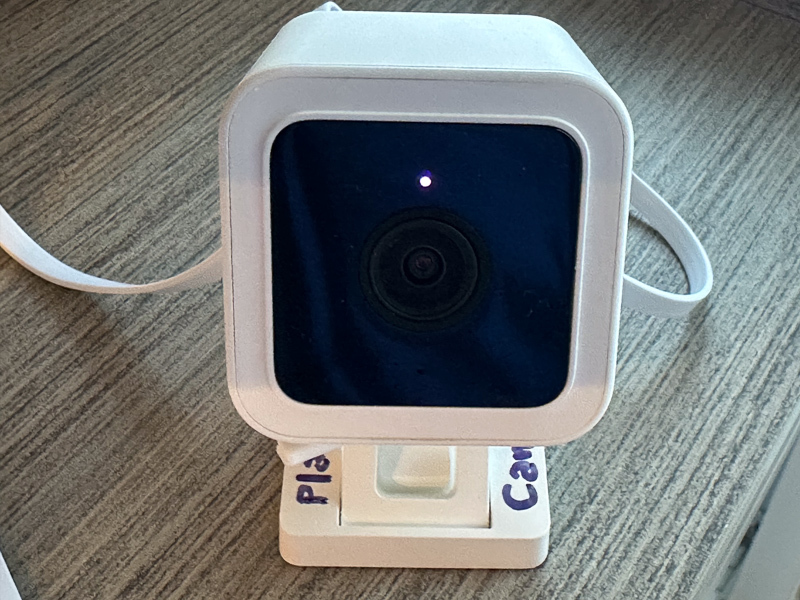
The WyzeCam3 is a relatively cheap device that can capture video. It can be set up for motion capture or continuous recording. But even if you install a memory card in the device, it will want to use the company’s app and stream data via their cloud storage. I don’t know much about how much thought went into their codebase with regard to security, but this is the kind of device where the usual answer is “not much.”

Furthermore, the WyzeCam requires an app for installation and configuration, and the WyzeCam3 needs to connect to your 2.4GHz WiFi network. Oops. I have no 2.4GHz WiFi network. It’s all 5Ghz here. Now what?

Enter Thingino, an open-source replacement firmware. One nice feature is that it allows the camera hardware to enable an Wi-Fi access point (“AP mode”) — it creates its own 2.4GHz WiFi network, which my Mac will happily connect to! Once the camera is set up, I can further customize things, and have it write motion capture files to the SD memory card rather than someone’s cloud.

You’re being watched…

So, there’re a few gotchas that were not obvious to me:

  1. When you’ve downloaded the firmware, you need to use something to flash it as an image on your micro-SD (e.g., Balena Etcher, Rufus, or the like). I came across at least one guide that said “simply copy the files onto the SD card” which is incorrect!
  2. When the Thingino installation has completed, you connect to the WiFi network it creates. A captive portal form pops up for basic configuration. You’re asked to provide a device name, a root password, and a WiFi SSID and password. There’s also a checkbox to have the camera create its own WiFi hot-spot (the aforementioned AP mode). If you’re going to have it work in AP mode, the SSID and password you provided above are used for the network it creates. If you are not, it will use those to connect to an existing network. Don’t make the mistake of giving the SSID and credentials for your existing network and then checking that checkbox!
  3. Once you’ve installed Thingino via the SD card and you’ve connected to the network admin, you might want to set up motion capture to “Storage.” You’re gonna have to reformat that SD card first! The UI won’t complain, or tell you why it’s not working, but it just won’t let you submit the form. Thingino recommends formatting in exFAT.
  4. Even if you’ve configured the “Motion” panel, you have to click on the Storage link and tell it that you really mean the storage mounted at /mnt/mmcblk0p1 (or the mountpoint for your SD card ). You can have motion sensing and capture enabled, but it will fail if you haven’t taken that step.
  5. You may need to go into storage manager to tell it how to clear off space before you can enable motion capture. The control panel for motion capture does not seem consistent.
  6. Even after all that, the motion capture details may not save correctly. At least the firmware version I downloaded, it just wouldn’t save the settings consistently. There is a workaround! You have to ssh in to the camera, and set the values:
    Enable motion detection
    jct /etc/prudynt.json set motion.enabled true
    jct /etc/prudynt.json set motion.send2storage true
    Configure the storage destination
    jct /etc/send2.json set storage.mount /mnt/mmcblk0p1
    jct /etc/send2.json set storage.send_video true
    Set motion sensitivity, range is 1-8, default is 1. Higher = more sensitive
    jct /etc/prudynt.json set motion.sensitivity 5
    Configure clip length (in seconds)
    jct /etc/prudynt.json set motion.video_length 15
    Restart prudynt
    /etc/init.d/S31prudynt restart
  7. If you want to restore the original WyzeCam firmware, the instructions say to copy the original config files that get backed up by the Thingino install into the root directory of the SD card, name the file autoupgrade-full.bin, and then power it up. Oh, did you have that SD card formatted in exFAT? Ha ha, the firmware replacement process requires the SD card to be formatted FAT32 with Master Boot Record (MBR). The failure mode for this is somewhat opaque — it does seem to do something, and then in my case it announced it was ready for setup… in Italian. It was not ready for setup, though, as it hadn’t replaced the firmware.

Other Problems:

  1. There’s no way to have the device do its own time management without a network (NTP). You can set the clock (ssh in, use the “date” command in BusyBox) but it doesn’t survive power-cycles.
  2. I set up an isolated 2.4GHz guest network for the cameras that only allows DNS and NTP traffic to/from the internet. Then I went to reconfigure the cameras to use that network. From the admin panel, when I changed the network settings and turned off the “create AP,” it never seemed to connect. I had to reflash to the original firmware and then reinstall Thingino.

Other notes:

  1. If you set up the Thingino camera with an AP network, it defaults to the IP address 100.64.1.1

Wed, 6 May 2026

Boring birds

— SjG @ 8:54 am

Many years ago, as a young stripling, I was on a Sierra Club hike when an older gentleman told me he figured I’d probably become a birder. Now, I’ve always had a fascination with and affinity for some kinds of birds — ravens and crows, hawks and owls — but never thought of myself as particularly interested in birds. So I’d expressed doubt to the gentleman, who explained to me that “all the better people who have an interest in nature become birders eventually, if they live long enough.” While flattered to be considered “better people,” I was still skeptical.

Well, I’m a lot older now than I was. Several college friends have extensive camera rigs for birding and take astonishing pictures, and I find that I too am interested in bird photography. On the Fediverse, I follow many avid birders, and I am catching the contagious enthusiasm of seeing a new species or the first view of the year of a migrating species. I still don’t consider myself a birder, but after watching this video with Christian Cooper, I may reconsider.

I’ve shared hummingbird pictures here before. They’re fascinating and colorful and have a lot of character. But one thing I’ve “discovered” of late is just how interesting the typical boring garden-variety “little brown birds” can be! We have a bird feeder, and will sometimes toss little bits of peanut to a song sparrow while sitting out on the front porch. We dubbed the swallow “Squeaker,” and it’s a comical little bird, who will beg and scold us when we go out front.

Squeaker

Then, to our surprise, one day we realized that Squeaker was not a single bird, but at least a pair, and possibly their kid too. It was just that before the realization, we’d only seen one of them visit at a time. The begging and scolding behavior seems to run in the family. We’ve seen one of them gather up bits of peanut to feed to another — whether it’s their mate, friend, or offspring, we don’t know.

Squeaker … or Squeakette?

Song-sparrows are super common in Los Angeles. They’re everywhere. But take a look at them! Look at those feather patterns, and the little eyelash feathers. They are amazing critters.

Which one are you?

These little loud birds have a lot of personality, but they’re not the only ones. Up at my mom’s house, there’s a dark-eyed junko that’s nesting in one the flower pots. If Squeaker et al are comical in their demanding behavior, these junkos are hilarious little hoppers that bounce their way around the patio like little cartoon characters.

Boooooiiiiing!

This year, I’ve really started noticing the warblers. We’ve had a family of orange-crowned warblers hanging out in the garden. They’re voracious hunters, and I can often hear their trill as they pop around in the bushes hunting caterpillars and spiders.

Hunting

Check out that intense look. If I were smaller, I certainly wouldn’t want to have that look directed at me.

Over in the nasturtiums, there was a looper. I didn’t see it, but this little warbler sure did.

Caught one.

In this last shot, I saw the younger bird sitting fairly still and trilling, mostly hidden by branches. It was largely ignoring me. The branches blocked me getting a good photo, but then suddenly it turned around and came out into the open. I started snapping away, and missed the focus by a bit, but did manage to get a view of the parent coming with a big beak-full of crunchy insects.

More!

There’s a lot of drama in the garden. And it turns out even “boring” little brown birds have a lot more going on than I thought — all I had to do was take a look.

Mon, 13 Apr 2026

Fight the Power(lines)!

— SjG @ 10:45 am

It’s pretty widely understood that photography doesn’t do a very good job of representing objective reality. Choices of cropping, exposure, color balance, saturation, etc, all can be used to project a specific narrative. That being said, I (for the most part) try to do minimal processing beyond those adjustments on most pictures I share.

However, I do digitally alter some photographs for aesthetic purposes. I try to be up front about it when I do (for example, see this picture).

This picture, taken at Descanso Gardens on April 11, 2026, and without any post-processing at all tells a bunch of lies.

Rose Garden

What lies does it tell? It hides the crowds, for one thing. The field is flattened, making the roses appear to be almost a hedge. Here’s a more honest view of the scene:

Crowded day at Decsanso’s Rose Garden

So, by standing over where the guy in the pale blue shirt is taking a picture, and holding my camera low to the ground, I could capture that image above. Then, because I let the camera determine the exposure, the original image underexposed the foreground in order to preserve the cloud details. The color balance was for cloudy skies, and I wanted it to look sunnier. So I punched up the shadow exposure, tweaked the color temperature a tiny bit, and increased the vibrancy by a about 10% percent. Because the overall exposure was increased, I had to adjust highlight settings to pull the cloud detail back in.

Since I was already in fantasy land, I decided to improve it even further by getting rid of those unsightly power lines. Here’s the final result:

Rose Garden
Filed in:Art, General, Photography

Mon, 16 Mar 2026

Flower Season

— SjG @ 7:14 pm

In southern California, with judicious planting, it can be flower season year ’round. But even so, Spring is special.

Sat, 28 Feb 2026

MacOS frustration

— SjG @ 12:18 pm

I keep all my old scanned records in encrypted APFS disk images, one disk image per year. I do have my Mac filesystem encrypted too, which protects against unauthorized access if the machine gets lost or stolen. However, by keeping these records on encrypted disk images that I only mount when they’re in use, I add a bit of protection against rogue software exfiltrating the data.

It’s probably absurd to use this kind of protection for simple stuff like old utility bills, but a little paranoia can prevent a large headache, as the saying goes*.

Today, I wanted to look at an old file, and was getting “Permission denied” errors from the Preview app. Looking at the file information from the finder (and then from the terminal) showed permissions were fine. I tried double clicking on the file, and got the permission denied message — including the name of a different file than the one I was trying to open. [o.shit.emoji]

I ran Disk Utility’s “first aid” on the image, and that said everything was fine, but I continued to get the error. I ran fsck_apfs on the image too (specifically, hdiutil attach -nomount /path/to/my/file and then fsck_apfs -y /dev/disk6s1). That’s probably what Disk Utility was doing under the hood, but I figured I’d try it anyway. Same error.

Then I said “[bleep] it!” and rebooted the system. Mounted the disk image, and everything’s fine. Computers suck 🙁

* It does go like that, doesn’t it?